Why Isn’t My Business Showing Up on Google Maps?
You open Google Maps, type in your own business name, and nothing comes up. Or maybe you do appear, but when you search “roofer near me” from the parking lot, three competitors show up and you don’t. Either way, it’s frustrating, because the map is often the first place a nearby customer looks.
The good news is that a business not showing up on Google Maps usually comes down to a short list of causes. The trick is figuring out which kind of problem you have, because the fixes are different. Here’s how to sort it out.
First, find out which problem you have
Start with two quick searches on your phone. Use a private or incognito window so your own account doesn’t skew the results.
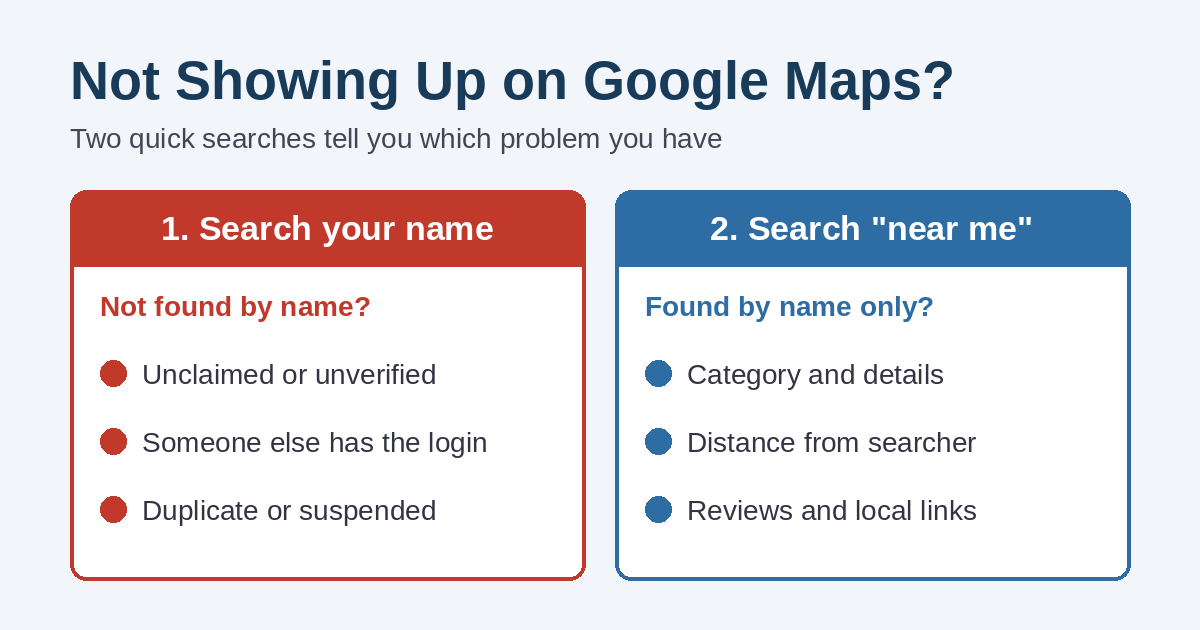
- Search your exact business name on Google Maps. If your profile doesn’t appear, even by name, you have a profile problem. Google either doesn’t have a listing for you or isn’t showing the one it has.
- Search what a customer would type, such as “plumber” or “pizza near me.” If you show up by name but not here, you have a ranking problem. Your listing exists, but Google doesn’t see it as the best match yet.
Keep in mind that map results change with where the searcher is standing. A customer across town may see a different list than you do at your desk. So try the second search from a couple of places you actually serve.
Not showing up on Google Maps at all? Check these first
Your Google Maps profile was never claimed or verified
Plenty of owners assume Google created their listing automatically and that’s the end of it. Sometimes Google does create one, but nobody has claimed it. In other cases, someone started setup years ago and never finished.
Google says verification tells it you’re authorized to represent the business, so the profile is more likely to show up in results. If you’ve never completed it, start with Google’s guide to verifying your business.
Someone else controls it, or there are two of them
A former employee, an old marketing company, or a previous owner may still hold the login. Google lets you request ownership of a Business Profile that someone else manages.
Also look for duplicates. Google’s guidelines call for one profile per business, and extra listings can cause problems with how your information shows on Maps. Duplicates often appear after a move, a rename, or a second person “fixing” the listing.
Your Google Maps profile was suspended
Google can suspend or limit a profile that breaks its guidelines for representing your business. Common triggers include stuffing extra keywords into the business name, using an address customers can’t actually visit, or listing information that doesn’t match the real world. If you see a notice in your profile, fix the cause first. Then follow the steps Google offers there to request a review.
You’re a service-area business
If you go to customers, like a plumber or a cleaning service, Google says to remove your address if you don’t serve customers there. In that case, you won’t see a pin at your house. That’s normal, not a sign that something is broken.
Instead, you set the area you serve. According to Google, you can choose up to 20 service areas by city or ZIP code, and the overall area shouldn’t be more than about two hours’ drive from your base. We cover how home-based businesses can handle this on our China Township page.
You just made changes
New profiles and recent edits aren’t always instant. Google notes that service area edits may take up to 48 hours to show after approval. If you changed something yesterday, give it a little time before changing it again.
Showing up by name, but not for the searches that matter
This is the more common situation. Google says local results are mainly based on three things: relevance, distance, and prominence. It also states plainly that there’s no way to request or pay for a better local ranking. You can read the details in its tips to improve your local ranking.
Relevance: does your Google Maps profile match the search?
Relevance is how well your profile matches what someone typed. Your primary category matters most here. A landscaper listed only as “Snow removal service” will struggle in July.
Google’s guidelines say to choose the fewest categories that describe your core business. After that, fill in your services, hours, description, and photos. Complete, accurate information gives Google more to match against.
Distance: you can’t move, but you can be accurate
Distance is how far you are from the person searching. You can’t change it, and you shouldn’t fake it with a virtual office or a borrowed address. That’s a common route to suspension.
What you can do is make sure your address or service area is precise. On your website, useful pages for the towns you serve help people and search engines understand where you work. We explain that approach in how city landing pages help local businesses.
Prominence: how well known you are
Prominence is how well known your business is. Google says this is based partly on how many websites link to you and how many reviews you have, and that more reviews and positive ratings can help.
For most small businesses, reviews are the most practical place to start. Here’s how to get more Google reviews without breaking Google’s rules. Local links help too, such as a chamber of commerce listing, a supplier’s dealer page, or a sponsorship mention.
Your website and profile tell different stories
If your website lists one phone number and your profile lists another, customers notice, and the mixed signals don’t help. Line up your name, phone, hours, and services in both places. We walk through it in why your website and Google Business Profile should match.
Shortcuts that make things worse
When a business isn’t showing up on Google Maps, it’s tempting to try a quick fix. However, these tend to backfire:
- Adding a city or keywords to your business name, like “Smith Plumbing Best Plumber Port Huron”
- Creating a second profile for another town you serve
- Using a mailbox store or virtual office as a storefront address
- Paying anyone who promises a guaranteed top spot on the map
- Buying or trading reviews
Ads are a separate matter. A paid ad can appear above the map results. Still, it doesn’t change where your free listing ranks.
A quick Google Maps checklist
- Search your business name in a private window. Do you appear?
- Confirm you can sign in to the profile and that it’s verified.
- Check for duplicate listings and suspension notices.
- Review your primary category, services, and hours.
- Set an accurate address or service area, not both if you don’t host customers.
- Ask happy customers for reviews, and reply to them.
- Make sure your website matches your profile details.
- Keep the profile active with photos and regular Google Business Profile posts.
Want a second set of eyes on your listing?
Sometimes the cause is obvious once someone else looks. Other times it takes a little digging through old logins, duplicate listings, and category choices. Simplified Internet Design helps St. Clair County and Southeast Michigan businesses set up, clean up, and manage their Google Business Profiles alongside their websites. If you’re not showing up on Google Maps and can’t tell why, get in touch and we’ll take a look.