
What Is Schema Markup, and Does a Small Business Need It?
Someone told you your website needs “schema.” Maybe it was an SEO report, a plugin warning, or a sales email promising star ratings in Google. It sounds technical, and it is a little technical. But the idea behind it is simple, and most small businesses only need a small piece of it.
Here’s what schema markup is, what it can and can’t do for a local business, and how to check what your site already has.
What is schema markup?
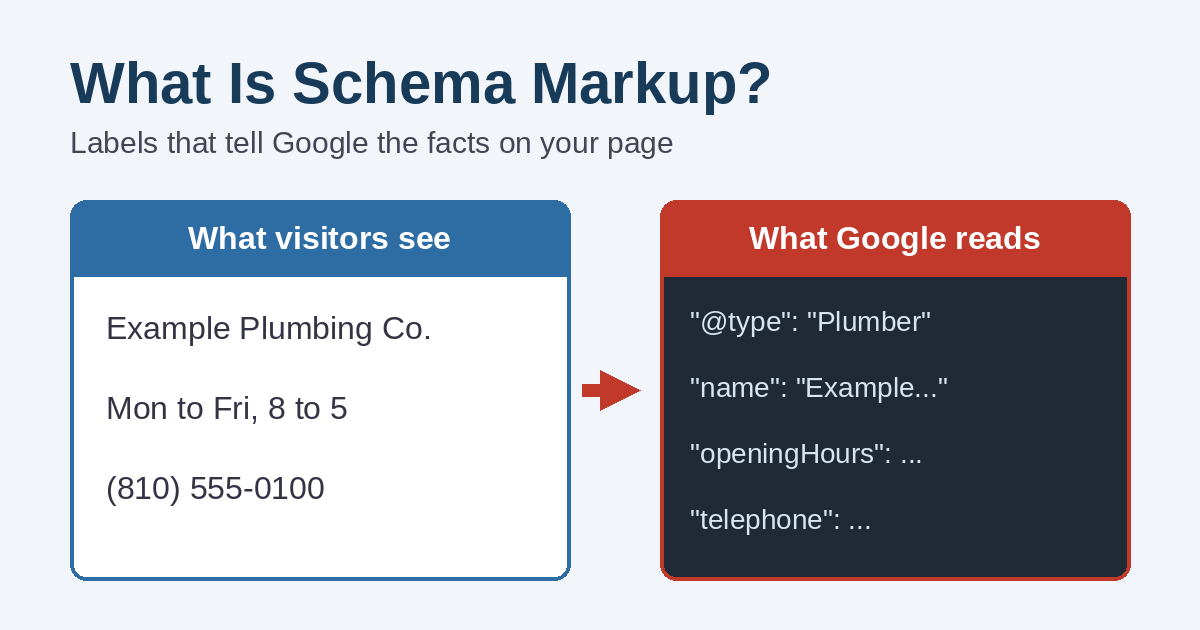
Schema markup is a small block of code on a web page that labels the facts on that page. A person reading your contact page knows that “Mon to Fri, 8 to 5” is your hours. Google can usually figure that out too, but schema markup spells it out: this is the business name, this is the phone number, these are the hours.
The labels come from a shared vocabulary at schema.org, which the major search engines support. Google calls the result “structured data.” In practice, the two terms mean nearly the same thing.
Visitors never see it. The code sits in the page behind the scenes, so adding it doesn’t change how your website looks.
What schema markup actually does for you
It helps Google understand the page
According to Google’s introduction to structured data, Google uses it to understand what a page is about and to learn about the people and companies described on it. For a local business, that means clear, consistent facts about who you are and how to reach you.
It can make a page eligible for rich results
Rich results are the search listings with something extra, such as recipe photos, event dates, or product prices. Schema markup is how a page becomes eligible for many of them. However, eligible is the key word. Google says it doesn’t guarantee these features will show, even when the code is perfect.
What it won’t do
Schema markup is not a shortcut to the top of Google. It won’t fix thin pages, a slow site, or a weak Google Maps presence. Think of it as clear labeling on a good product. The labeling helps, but the product still has to be good.
Schema markup has changed. Some old advice is outdated
A lot of schema advice online was written a few years ago, and Google has since dropped several features. For example:
- FAQ rich results are gone. Google stopped showing FAQ rich results starting May 7, 2026, according to its Search Central changelog. Before that, they had already been limited to well-known government and health sites since 2023.
- How-to rich results were retired in 2023.
- Several niche types were phased out in 2025, including course info, estimated salary, and vehicle listings.
So if a vendor is still selling “FAQ schema for more space in Google,” that pitch no longer holds up. A real FAQ section can still help your visitors. It just won’t earn a special search listing anymore.
Star ratings for your own business are a special case
This one surprises people. Google’s rules say review stars in search results are for sites that collect reviews about other businesses. If you add star-rating code to your own site about your own company, Google treats that as self-serving and won’t show the stars. Your Google reviews still matter a great deal, though. They show up on your Business Profile, which is where customers look. Our guide on getting more Google reviews covers how to grow them the right way.
The schema markup most small businesses actually need
For a typical local business, a short list covers nearly everything:
- Organization or LocalBusiness. Your business name, logo, website address, and phone number. A business with a public storefront can add its address and hours. Google’s local business structured data guide recommends the most specific type that fits, such as Restaurant, Dentist, or Plumber.
- WebSite and WebPage. Basic labels that tell Google what each page is.
- Breadcrumbs. These show where a page sits on your site, like Home, then Services, then Roof Repair.
- Article. This identifies blog posts, with the title, date, and author.
- Product. Online stores should mark up products with price and availability.
- Event. This fits businesses and organizations that post real, dated events.
That’s usually it. A landscaper or accountant doesn’t need dozens of schema types. The goal is accurate basics, not the longest possible list.
A quick look at the code
You don’t need to write this yourself, but here is a simplified example for a made-up business, so you can see how plain it is:
{
  "@context": "https://schema.org",
  "@type": "Plumber",
  "name": "Example Plumbing Co.",
  "url": "https://www.example.com/",
  "telephone": "+1-810-555-0100",
  "openingHours": "Mo-Fr 08:00-17:00"
}
It’s just labeled facts. The hard part isn’t the code. Instead, it’s making sure those facts are correct and stay correct.
Does your WordPress site already have schema markup?
There’s a good chance it does. SEO plugins such as Yoast SEO add basic schema markup automatically, including WebSite, WebPage, Organization, breadcrumbs, and Article for blog posts. Shopify themes and many website builders include product and store basics, too.
The catch is that automatic schema is only as good as its settings. If the plugin was never set up, it may describe your business as a person instead of a company, show the wrong logo, or leave out details. To check, do this:
- Open Google’s Rich Results Test and enter your homepage address.
- Look at what it detects. You’ll see items such as Organization or Breadcrumbs, plus any errors.
- For a fuller view of every label on the page, try the Schema Markup Validator.
- After changes, watch the enhancement reports in Google Search Console for errors on other pages.
Rules that keep schema markup from backfiring
Google’s structured data guidelines are clear that the markup must match what people see. A few practical rules follow from that:
- Only label what’s on the page. Don’t add hours, prices, or services in the code that visitors can’t find on the page itself.
- Keep it current. When your hours or phone number change, update the website, the schema, and your Business Profile together. Our post on why your website and Google Business Profile should match explains why consistency matters.
- Don’t fake reviews or ratings. Misleading markup can lead to a manual action from Google, which removes your eligibility for rich results.
- Pick one tool. Two plugins adding the same schema can create duplicate or conflicting labels. Choose one and turn off the other’s schema output.
So, does a small business need schema markup?
Yes, in a modest form. Accurate basic schema is worth having, and on most WordPress sites it takes setup rather than custom code. Advanced schema projects, on the other hand, rarely pay off for a small local business unless you sell products online or post a lot of events.
If you’re not sure what your site is telling Google, we can check it for you. Simplified Internet Design reviews and sets up schema markup as part of our website development services for businesses in St. Clair County and Southeast Michigan. Contact us for a quick, plain-English look at your site.
