Landing Pages vs Homepage: When Each Helps a Small Business
Landing pages vs homepage often comes down to one thing: you paid for a click. The person who clicked already raised a hand. Then they landed on a page full of menus, blog links, and six different service buttons — and left without calling.
That pattern shows up a lot when ads send people to a homepage. The homepage isn’t “wrong.” It just has a different job than a landing page. Knowing the difference helps you spend less money on clicks that go nowhere.
This post is about landing pages vs homepage choices for campaigns — Google Ads, Facebook ads, seasonal offers, and one-service promotions. It is not about city SEO pages. Those are a separate tool, and we cover them briefly near the end with a link to our older guide.
Homepage job vs landing page job
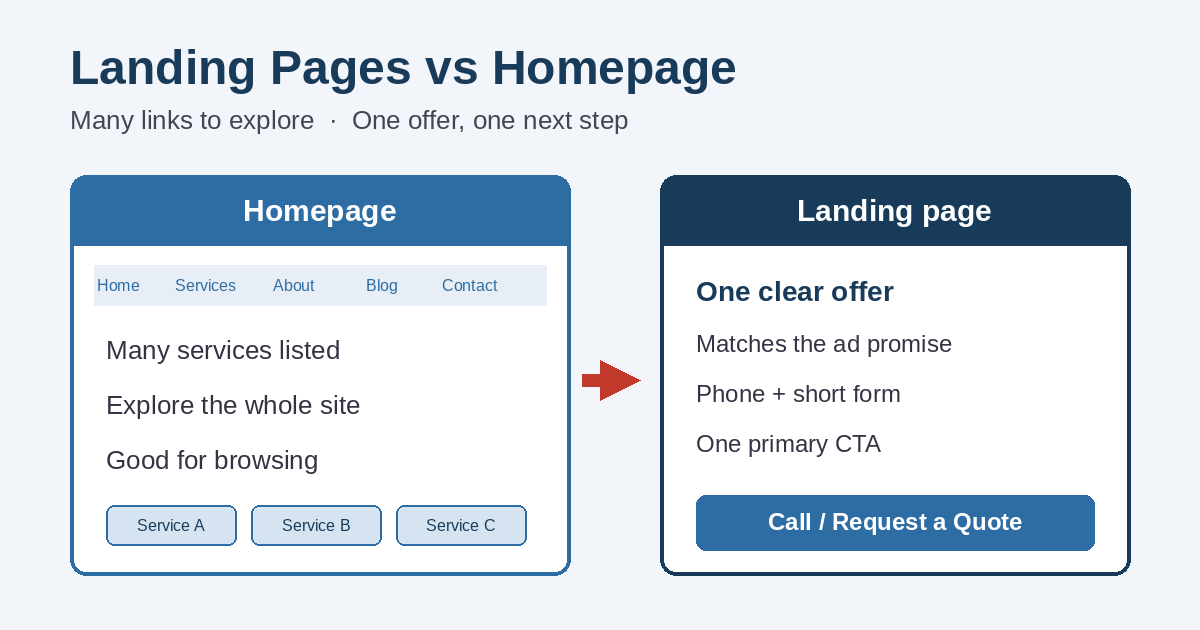
A homepage is the front door. Its job is to orient someone who arrived on their own — a referral, a branded search, a bookmarked visit, or someone browsing what you offer. It usually introduces the business, points to several services, and invites people to explore.
A landing page is a destination built for one job. Someone clicked an ad or a specific campaign link. They already saw a promise. The page should match that promise, answer the next questions, and make the next step obvious: call, request a quote, or book.
In Google Ads, the page after the click is literally called the landing page. Google also looks at how useful and relevant that page feels as part of Quality Score. You don’t need to chase a perfect score. You do need the page to match what the ad offered.
Landing pages vs homepage: when the homepage is fine
Plenty of traffic should go to the homepage. Forcing a landing page everywhere creates extra pages you don’t need.
- Branded and referral visits. Someone already knows your name, or a friend sent them. They want the big picture.
- People who are still comparing options. They may want several services, pricing ranges, or proof before they call.
- Organic search for your business name. Your homepage (and Contact page) should load cleanly and make the phone number easy to find.
- General “what do you do?” traffic. A clear homepage with solid service links often beats a thin one-offer page.
If your homepage already loads fast on phones, shows a clear phone number, and makes it easy to reach the right service page, organic visitors often do fine there. Problems show up more when paid traffic that came for one offer gets dumped into a general overview.
Landing pages vs homepage: when a landing page helps more
Use a dedicated landing page when the visitor arrives with a narrow intent. That is the core of the landing pages vs homepage decision for advertising.
Google Ads or Facebook ads for one service
If the ad says “roof repair in Port Huron” or “same-week HVAC tune-up,” the clicker expects that topic on the next screen — not a tour of every service you offer. Sending ad traffic to a matching page is also one of the first checks in our guide on Google Ads without leads.
One offer, one promotion, or one season
Spring clean-out specials, holiday hours, financing for a single product line, or a limited consultation offer all work better on a focused page. You can change the headline and proof without rewriting the whole site.
A campaign you need to measure cleanly
When every ad points at the homepage, it’s harder to tell which message produced the call. A dedicated URL (or a tracked path to a dedicated page) makes reporting simpler for you and for anyone managing the account.
What a good landing page needs
You don’t need a long page. You need a clear path. Most small-business landing pages that work share the same basics:
- Match the ad promise in the first screen. If the ad mentioned a service, town, or offer, the headline should echo it. Mismatch is why people bounce.
- One primary call to action. Call now, request a quote, or book — pick the main action. Secondary links can exist, but they should not compete visually with the main button or phone number.
- Phone and form, both working. Many local buyers still prefer to call. Others will fill a short form after hours. Make sure the form actually delivers mail; a broken form wastes paid clicks. See our notes on a contact form not sending emails.
- Short, relevant proof. A few real review quotes, years in business, licenses, or before/after photos beat a wall of fluff. Don’t invent testimonials.
- Mobile-first layout. Big tap targets, readable type, and a sticky or early phone link help. Most ad clicks arrive on phones.
- Fewer distractions. Trim the full site menu if it pulls people into blog archives, unrelated services, or dead ends. Keep a simple way back to the main site for those who want it.
If calls are the goal, also check why a site might fail to produce them in the first place — our post on why a website isn’t generating phone calls covers speed, mobile usability, and contact clarity.
Common landing pages vs homepage mistakes
These are the patterns we see most often when ad spend rises and leads don’t:
- Sending every ad to the homepage. The visitor has to re-find the offer they already clicked. Many won’t.
- Too many CTAs. “Call,” “email,” “chat,” “download,” “follow us,” and “see all services” on one screen dilutes the next step.
- Offer mismatch. Ad promises 20% off; page never mentions it. Or the ad names one service and the page leads with another.
- No tracking plan. Without call tracking, form goals, or clear campaign URLs, you can’t tell whether the page helped.
- Ignoring search terms. Broad keywords can send the wrong intent to even a good page. Pair landing pages with tighter targeting and negative keywords in Google Ads.
How this differs from city SEO landing pages
SID also publishes geographic service-area pages — for example, website design pages aimed at towns and townships across St. Clair County. Those pages support organic local search. They explain services in a place context and help the site cover real communities.
That is a different purpose from a campaign landing page. A city SEO page can still convert, but its job is visibility and relevance over time. A campaign landing page’s job is to finish the promise of a specific ad or offer right now.
If you want the SEO version of the topic, read how city landing pages help St. Clair County businesses with local SEO. Today’s article is about conversion destinations for ads and promotions, not about ranking for city terms.
Landing pages vs homepage checklist
Before you change where ads point, run through this short list:
- What promise did the ad or campaign make?
- Does the destination page show that promise above the fold on a phone?
- Is there one clear primary action, with phone and form both easy to use?
- Did you remove extra navigation that steals attention from that action?
- Can you tell which campaign produced the lead?
- If the visitor just wants to learn about the whole business, does a strong homepage or service page still exist for organic and branded traffic?
Homepage and landing pages are not rivals. They solve different arrivals. Use the homepage for exploration. Use a landing page when someone already chose a specific offer.
Need help matching pages to your campaigns?
Simplified Internet Design builds and maintains websites for small businesses in St. Clair County and Southeast Michigan, and we also help with Google and Facebook advertising management. If your ads send people to a busy homepage and the phone stays quiet, we can review the path from click to call — including whether a focused landing page or clearer website design changes would help.
Contact us for a plain-English look at your current destinations. Bring a sample ad and the URL it uses today. We’ll tell you whether the homepage is fine, or whether a dedicated page would give those clicks a fair chance.