Should Your Business Email Be Gmail or Your Own Domain?
Plenty of local businesses start out with an address like smithplumbing.mi@gmail.com. It’s free, it works, and you already know how to use it. So is a free Gmail account good enough for your business email, or should you switch to an address on your own domain, like office@smithplumbing.com?
The honest answer is that free Gmail works fine for some very small operations. However, once other people depend on that inbox, or customers find you mostly online, your own domain usually wins. Below is how to decide, what changes when you switch, and how to do it without losing mail.
What “business email on your own domain” means
Your domain is the name of your website, such as yourbusiness.com. Business email on that domain simply means addresses that end with it, like info@yourbusiness.com or jen@yourbusiness.com.
Here’s the part many owners miss. A domain address is not a different kind of inbox. You can still read it in the Gmail app or Outlook. The difference is who controls the address. With @gmail.com, Google owns the name and you rent one account. With your own domain, you own the name and choose which company handles the mail behind it.
When a free Gmail address is fine for business email
A free account can be a reasonable choice if:
- You’re a one-person business just getting started and testing the idea
- Most customers find you through word of mouth and call rather than email
- You don’t have a website or domain yet
Even then, set it up carefully. Use a name that clearly matches your business, turn on 2-Step Verification, and add a recovery phone number that belongs to the business. That way one forgotten password doesn’t lock you out of every customer conversation.
Why your own domain usually makes better business email
It looks like an established business
When a homeowner gets two quotes, one from bestroofing1987@gmail.com and one from estimates@yourroofing.com, the second simply looks more established. It isn’t a guarantee of quality, of course. Still, it matches your website, your truck lettering, and your Google Business Profile, and that consistency builds trust before anyone reads the message.
The address stays yours if you switch providers
If you ever leave a free Gmail account, the address goes with it. With your own domain, you can move from one email provider to another and keep the exact same address. Customers, vendors, and old invoices keep pointing to the right place.
It’s easier to manage people coming and going
Many small businesses share one free login among several employees. That works until someone leaves with the password, or the recovery phone is a former employee’s cell. With domain email, you can create role addresses such as office@ or service@, give each person their own login, and reset or remove access when staff changes.
Your website and other tools can send mail properly
Website contact forms, booking tools, and invoice software often send email “from” your address. If that address is @gmail.com, those systems are pretending to be Gmail. Google’s email sender guidelines tell senders not to impersonate Gmail From: addresses, and messages that do can be filtered or blocked. With your own domain, you can authorize those tools correctly. It’s also a common reason a contact form stops sending emails.
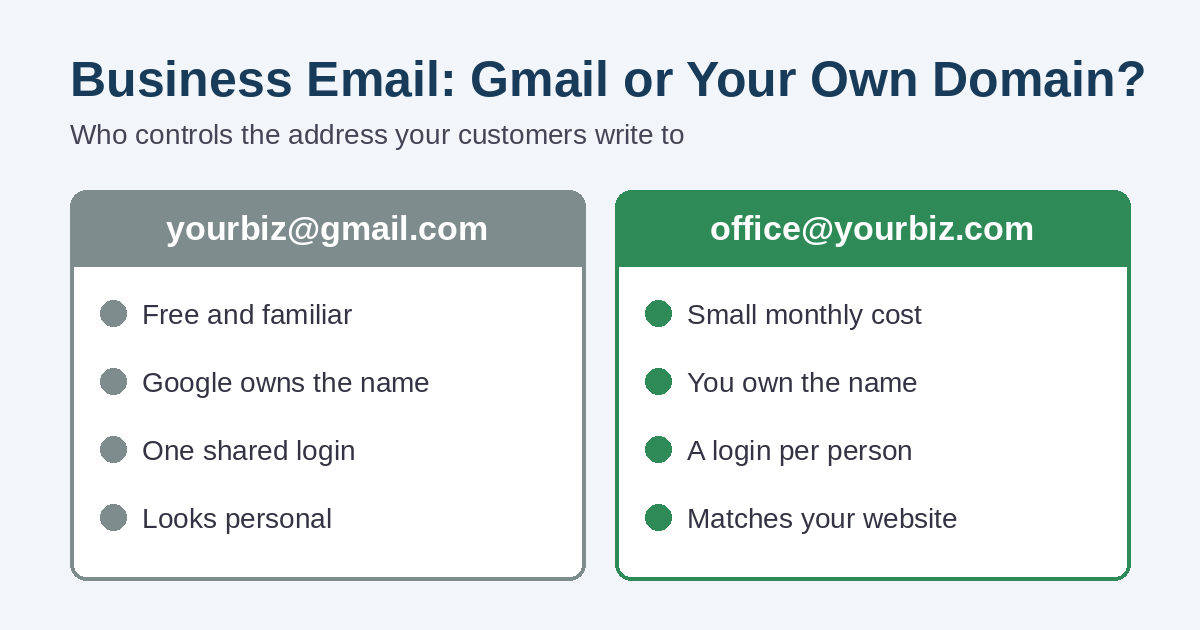
Gmail vs. your own domain at a glance
- Cost: free Gmail costs nothing. Domain email adds the domain renewal plus an email plan, which may be part of your hosting or a separate monthly fee per user.
- Control: Google controls a free address. You control a domain address, as long as the domain is registered to your business.
- Staff changes: a free account is one shared login. Domain email lets you add, remove, and reset users.
- Look: a free address looks like a personal account. A domain address matches your website and branding.
- Deliverability: both can work well for normal one-to-one email. For forms, newsletters, and invoices, a domain with proper authentication is the safer setup.
Before you switch, check who owns the domain
Your business email is only as safe as your domain. If a former web designer, a relative, or an old marketing company registered it in their name, they also control your email. Therefore, log in to your domain registrar and confirm the account is in your business’s name and uses an email address you’ll keep. Our website and marketing costs checkup walks through the same ownership questions for hosting and other accounts.
Also look at when the domain renews and whether auto-renew is on. A lapsed domain takes your website and your email down at the same time.
How to move your business email to your own domain
The move itself is not complicated, but the order matters. Here’s a sensible order to follow:
- Pick an email provider. Common choices are Google Workspace (Gmail with your domain), Microsoft 365 (Outlook with your domain), or the email included with some website hosting plans. Choose based on the apps your team already uses.
- Create the addresses. Usually that means one for each person plus one or two shared role addresses, such as info@ for the website.
- Point your domain’s mail records to the new provider. These are MX records in your domain’s DNS settings. Google’s guide to setting up MX records shows what that step looks like.
- Add SPF, DKIM, and DMARC. These DNS records tell other mail servers which services may send as your domain. Without them, your new address can land in spam.
- Bring your old mail along. Major providers offer tools to import messages and contacts from a free Gmail account, so your history isn’t stuck in the old inbox.
- Keep the old Gmail account open and forwarding. Leave it active for several months, forward its mail to the new address, and set an auto-reply with the new address.
- Update the address everywhere. That includes your website, contact form, Google Business Profile, Facebook page, invoices, business cards, and vehicle lettering.
The last step is easy to rush. As we covered in why your website and Google Business Profile should match, mixed contact details make customers unsure which one is current.
Common business email mistakes to avoid
- Setting up forwarding only, so you can receive at your domain but still reply from Gmail
- Skipping SPF and DKIM, then wondering why quotes land in customers’ spam folders
- Using one shared password for the whole team
- Letting the web designer or IT person be the only one with the domain login
- Forgetting to update the website contact form, so requests still go to the old inbox
Need help setting up business email on your domain?
If you’re a business in St. Clair County or nearby in Southeast Michigan, we can help you check who owns your domain, set up business email that matches your website, and add the records that help your messages reach the inbox. If you run a home-based business, our China Township page covers a few extra points about looking established without a storefront.
Take a look at our website design services, or contact us and tell us what address you use today. We’ll tell you plainly what it would take to switch.