What Does Website Maintenance Include? A Checklist for Small Businesses
Most small-business websites don’t fail all at once, which is the whole case for website maintenance. A plugin falls a few versions behind, a backup quietly stops running, the contact form breaks after an update, and the hours on the home page still say “summer schedule” in November. None of it is dramatic on its own. Together, it’s how a site goes from working to embarrassing without anyone noticing.
Website maintenance is the routine work that keeps that from happening. If you’ve been quoted a monthly maintenance fee and wondered what you’d actually get for it, or you handle the site yourself and want to know what you might be skipping, this is the plain-English list.
What website maintenance includes (and what it doesn’t)
Think of maintenance as everything needed to keep the site you already have safe, working, accurate, and fast. It’s different from the other bills that come with a website:
- Hosting is the server space your site lives on. Our post on what website hosting actually includes covers where hosting stops and other work begins.
- Design or redesign is building new pages, layouts, or a whole new site.
- Marketing is the work of bringing in new visitors, like SEO, ads, and social media.
Some providers bundle these together, and some don’t. That’s why two “maintenance plans” at very different prices can both be honest. They just cover different things.
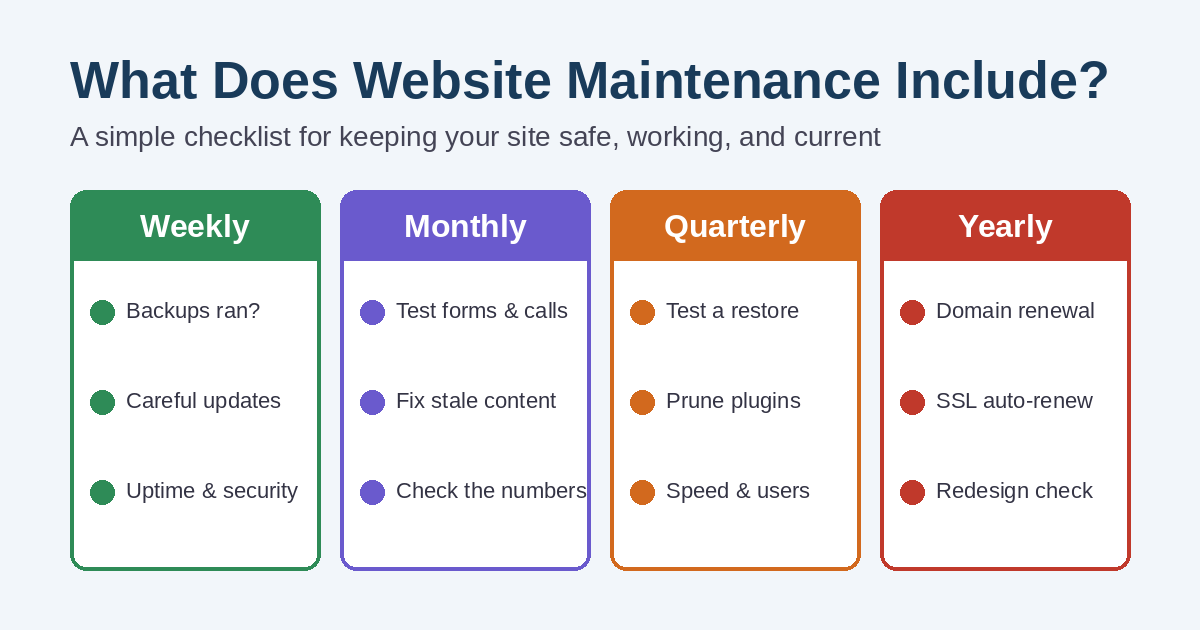
Weekly: the checks that catch problems early
Confirm backups actually ran
A backup schedule is only useful if the backups exist. Someone should confirm that recent copies of the files and the database were made and stored somewhere other than the same server. The WordPress handbook on backing up your site explains why both parts matter.
Apply updates carefully
WordPress core, themes, and plugins all release updates, and many of them fix security holes. Good maintenance follows a simple order: back up, update, then check that the site still works. Clicking “update all” and walking away is how sites break on a Friday afternoon. WordPress has its own guide to updating WordPress if you do this yourself.
Watch for downtime and security alerts
Uptime monitoring sends an alert when the site stops loading, so you hear about it before a customer does. Security scanning looks for malware, unknown admin accounts, and changed files. If you want to know what to do when the worst happens, read your website crashed, now what?
Monthly: keep the site working for customers
Test the forms and the phone links
Send yourself a test message through every form, and tap the phone number on your own phone. Forms are one of the most common things to break silently after an update. If messages aren’t arriving, our guide to a contact form not sending emails walks through the usual causes.
Update content that goes stale
Hours, holiday closures, prices, staff names, service lists, and seasonal promotions all drift out of date. Many maintenance plans include a set amount of small content edits each month, so ask how much is covered before you need it.
Look at the numbers
A quick monthly look at traffic, calls, and form submissions tells you whether something changed. Google Search Console also flags pages Google can’t index and security issues it has found. Here’s a plain-English guide to Google Search Console if you haven’t set it up yet.
Quarterly: the deeper checkup
Every few months, good website maintenance goes past the routine checks:
- Test a restore. Restore a backup to a staging copy to prove it works. A backup that has never been restored is still a guess.
- Review plugins. Remove anything you no longer use, and replace plugins that the developer has stopped updating.
- Check speed. New photos, plugins, and scripts slow sites down over time. Our post on why a WordPress website gets slow lists what to fix first.
- Clean up user accounts. Delete logins for former employees, old vendors, and anyone who no longer needs access.
- Look for broken links. Links to pages that moved or partner sites that closed make a site feel neglected.
Yearly: renewals and big-picture decisions
Once a year, confirm the domain name is renewed and registered in your name, the hosting plan still fits, and the SSL certificate renews automatically. Certificates are getting shorter lifespans, so manual renewal is a risk you don’t need. Our post on the “Not Secure” warning explains what happens when one lapses.
The yearly review is also the right time to ask whether the site still represents the business. If the answer is no, maintenance alone won’t fix it. That’s a refresh or redesign conversation.
Can you handle website maintenance yourself?
Yes, if you’re comfortable in the WordPress dashboard and you’ll actually do it on schedule. The tasks above aren’t secret. The real problems are time and consistency. Most owners start strong, then miss a few months during the busy season, which is exactly when a broken form or an unpatched plugin costs the most.
Hiring someone makes sense when the site brings in real calls or sales, when you don’t want to be the person fixing it at night, or when you’ve already had one scare.
Questions to ask before you pay for a maintenance plan
- How often are backups made, where are they stored, and when was a restore last tested?
- Do you test the site after updates, and what happens if an update breaks something?
- Who watches for downtime, and how fast will you respond?
- How many content changes are included each month?
- Will I get a short report of what was done?
- Is the domain, hosting account, and site login in my name?
Clear answers are a good sign. Vague ones usually mean the plan is mostly a monthly invoice. If you’re comparing what you pay several vendors, our website and marketing costs checkup can help you sort out what each bill covers.
Keeping your site in shape, without the guesswork
Simplified Internet Design handles hosting, updates, backups, monitoring, and content changes for small businesses and organizations around St. Clair County. You can see the full list on our website design and management services page, or read how we approach backups and security on our Burtchville Township page.
Not sure what your current setup is missing? Contact us and we’ll take a look at your site and tell you plainly what needs attention.