Why Is My Contact Form Not Sending Emails? How to Find and Fix It
A customer fills out the form on your website, clicks Send, and sees a friendly thank-you message. You never hear about it. If your contact form is not sending emails, that’s exactly how it fails: quietly, with no error on either side. The customer thinks you ignored them, and you never knew they asked.
The good news is that most form problems come from a short list of causes. This guide shows you how to test your own form in a few minutes, what usually goes wrong, and how to fix it so requests reliably reach your inbox.
First, test whether your contact form is sending emails
Before you change anything, find out what’s really happening. It only takes a few minutes.
- Use an outside address. Fill out your own form with a personal email, not your business address. Sending from your own domain to your own domain can hide problems.
- Try it on your phone. Most visitors will, so you should too.
- Check spam and junk. Look in every folder of the inbox that should get the message, not just the main one.
- Check the website itself. Many form plugins keep a list of entries inside WordPress. If your test shows up there but not in your email, the form works and the email delivery is the problem.
If the entry never appears anywhere, the form itself may not be submitting. That points to a different fix, which we cover below.
Why a form can say “thank you” and still lose the message
The thank-you message only means the website accepted the form. It doesn’t mean an email arrived anywhere. In fact, the WordPress developer documentation for its mail function says a successful result “does not automatically mean that the user received the email successfully.”
In other words, your website can hand off the message and move on. After that, it’s up to mail servers to accept it, and they can refuse it or file it as spam without telling anyone.
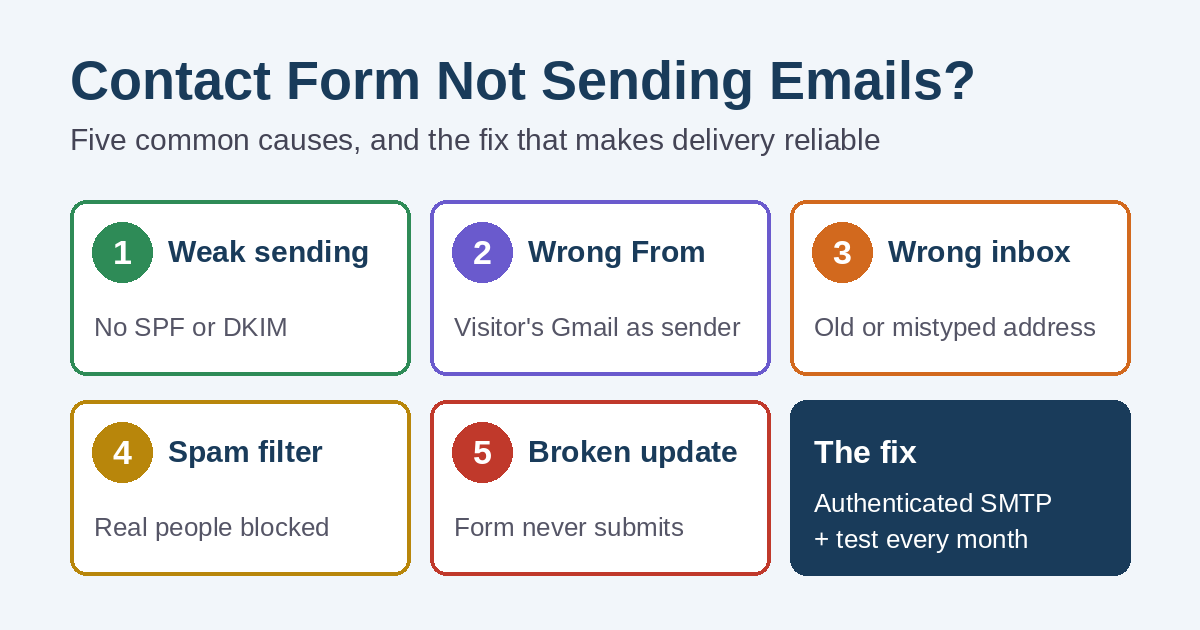
Five common reasons a contact form is not sending emails
1. The website sends mail the weak way
Out of the box, many WordPress sites send form email straight from the web server. Those messages often lack the checks that tell inbox providers the email is legitimate.
That matters more than it used to. Google says that starting February 1, 2024, anyone sending to Gmail accounts must set up SPF or DKIM for their sending domain. SPF and DKIM are DNS records that prove a server is allowed to send mail for your domain. Without them, form messages are more likely to land in spam or get rejected.
2. The “From” address belongs to someone else
Some forms are set up to send the message “from” the visitor’s own address, such as their Gmail. It seems handy, because you can just hit Reply. However, your website isn’t allowed to send mail for Gmail, so receiving servers may treat it as fake. Google’s sender guidelines specifically say not to impersonate Gmail addresses in the From line.
The better setup is simple. The email comes from an address on your own domain, and the visitor’s address goes in the Reply-To field. As a result, Reply still works, and the message passes the checks.
3. The message goes to the wrong inbox
This one is surprisingly common. For example, the form still sends to a former employee, an old address from a previous web designer, or an address with a typo. Sometimes the inbox is full, or a forwarding rule stopped working after an email change.
4. Spam protection is catching real people
Spam protection is important, because bots love contact forms. Still, filters and challenges can be too strict. A real request may be marked as spam inside the form plugin, so no email goes out at all. Check the plugin’s spam or blocked entries now and then.
5. An update quietly broke the form
Plugin, theme, and WordPress updates usually go smoothly. Once in a while, though, an update or a caching setting stops the form from submitting. For instance, the button may spin forever, or the page may reload with nothing sent. If your test entry never showed up in WordPress, start here.
How to fix a contact form not sending emails for good
Here’s the order we’d work through on a small-business website:
- Confirm the recipient. Check every address in the form’s notification settings, and remove any that nobody reads.
- Send through a real mail account. Use an SMTP plugin to send form email through your business email provider or a dedicated email-sending service, instead of the web server’s default mail.
- Fix the From and Reply-To fields. Send from an address on your domain, and put the visitor’s email in Reply-To.
- Check your DNS records. Make sure SPF and DKIM are set up for whatever service sends your mail. A DMARC record is a good next step.
- Save entries on the website. Turn on entry storage in your form plugin, so the website keeps a copy of every request even if an email goes missing.
- Test from outside your business. Send a test from a personal address and your phone, then confirm it lands in the main inbox.
- Retest after changes. Repeat the test after updates, after any email or hosting change, and about once a month.
If you’d rather not touch DNS records yourself, that’s normal. You can fix most cases of a contact form not sending emails without changing your website design at all. These settings live in your domain and hosting accounts, which is one reason it helps to know what your hosting actually includes.
What a broken form really costs
When a contact form is not sending emails, there’s no way to know how many requests it lost. That’s the real problem. A missing request doesn’t leave a trace. Meanwhile, the person who sent it has probably moved on to the next business in the search results.
A form is often the main way people reach you after hours. So it deserves the same attention as your phone. If calls are slow too, our guide on why a website isn’t generating phone calls covers the other side of the same problem. You can also track calls and form leads so you notice when the numbers suddenly drop.
Need help with a contact form not sending emails?
Simplified Internet Design builds and troubleshoots website forms for small businesses across St. Clair County and Southeast Michigan. That includes SMTP setup, business email configuration, spam protection, and testing. We’ve written more about building forms people actually finish, and you can see the rest of our website design services.
Not sure whether your form is losing messages? Contact us and we’ll test it with you. Then we’ll tell you plainly what, if anything, needs fixing.